 Email Warm-up
Secondary Domain Cold Email: Setup, DNS, Warm-Up and Limits
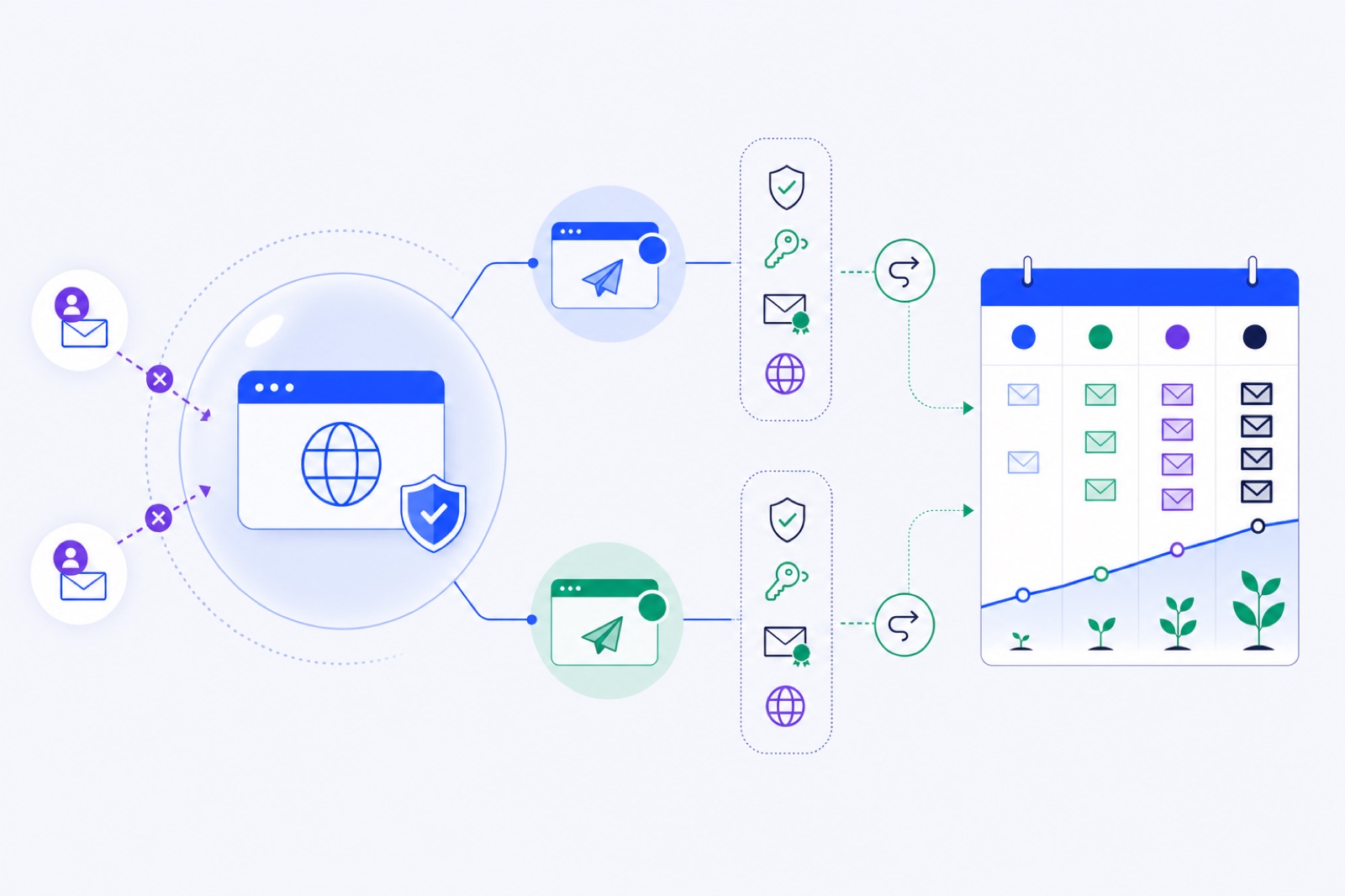
A secondary cold email domain should warm for 2–3 weeks minimum, or 4 weeks for a safer ramp, before full outbound. If you skip DNS, redirects and gradual sending, you risk spam placement and damage to the brand people recognise. Use this setup to choose the domain, authenticate it, warm mailboxes, and know when to slow down.
A secondary domain is not a trick. It is a risk boundary. Your primary domain usually runs your website, employee mail, invoices, support and password resets. Cold outreach has more unknown recipients, so it belongs on a separate domain. For the deeper reputation split, read domain warm-up versus mailbox warm-up before you add volume.
You still need normal deliverability work. SPF, DKIM and DMARC must pass. Your domain must look real. Your mailbox must behave like a normal mailbox. A warm-up tool can help with activity, but it cannot fix poor targeting, misleading copy or a bought list.
If you want the DNS foundation first, use our plain-English SPF, DKIM and DMARC guide. Then come back to the four-week ramp below.
Why use a separate domain?
Your main domain should be protected because it carries business-critical email. If example.com sends password resets, invoices and support replies, do not use the same domain for untested cold outreach.
A secondary domain gives you separation. If outreach performs badly, you can pause that domain without breaking internal mail or customer operations. This is not a guarantee of inbox placement. It is a sensible operating boundary.
Use a simple split:
- Primary domain: website, employee email, support and customer mail.
- Secondary domain: cold outreach mailboxes only.
- Tracking domain: optional, and ideally branded to the same secondary domain.
Do not use a secondary domain to disguise who you are. The company name, signature, website and unsubscribe path should make the sender clear.
Large teams often add domains instead of forcing more volume through one domain. For bigger fleets, a typical pattern is 2–5 mailboxes per domain. That keeps daily volume per domain lower and makes failures easier to isolate.
If you only need one or two mailboxes, one secondary domain is enough. More domains add DNS work, monitoring and renewal risk.
Which domain name works best?
Your secondary domain should look connected to your real company. It should not look like a phishing domain.
Good secondary domains usually use a clean modifier:
| Primary domain | Better secondary examples | Avoid |
|---|---|---|
acme.com | getacme.com, tryacme.com, acmehq.com | acrne.com, acme-mail-offer.com |
brightstudio.com | brightstudiohq.com, meetbrightstudio.com | brlghtstudio.com, bright-studio-deals.com |
northstar.io | northstarteam.com, trynorthstar.com | northstarr.io, northstar-free.com |
Avoid lookalike characters. Do not replace m with rn, l with 1, or o with 0. Those choices resemble impersonation tactics.
Avoid excessive hyphens. One hyphen is not always fatal, but domains with multiple hyphens often look disposable.
Avoid misleading TLD choices. If your real brand is a .com, a strange or unrelated extension can look temporary. That does not mean every non-.com domain is bad. It means the full domain should pass a human trust check.
Buy the domain for more than a short experiment if possible. Enable auto-renewal. Losing a sending domain can break replies, tracking, DNS records and mailboxes.
Before you create mailboxes, decide the sender format. Keep it boring:
firstname@trybrand.comfirstname.lastname@brandhq.comteam@meetbrand.comfor low-volume operational mail only
Do not create ten aliases that all send from one mailbox. Mailbox-level reputation still matters. Use real mailboxes if you need parallel sending.
How do you set up secondary domain cold email?
Set DNS before sending anything. Authentication is not optional for cold email. Google’s sender guidelines require authentication, and they recommend keeping spam complaints below 0.1% and avoiding 0.3% or higher. Yahoo states that senders need SPF, DKIM and DMARC, with a spam rate under 0.3%.
Use primary documentation when you check rules. Start with Google’s email sender guidelines and Yahoo’s sender best practices. If you send bulk mail, also support one-click unsubscribe using RFC 8058.
Your exact records depend on your mailbox provider. Google Workspace, Zoho, Lark, SES, SendGrid, Mailgun and hosting providers all give different DKIM selectors and SPF include values. Use the provider’s current values rather than copying old records from a blog post.
The structure is the same across providers:
| Record | Host/name | Value pattern | What to check |
|---|---|---|---|
| SPF | Root domain, often @ | v=spf1 include:provider.example ~all | One SPF record only; stay under the 10 DNS lookup limit |
| DKIM | Provider selector, such as google._domainkey | TXT or CNAME from provider | DKIM passes for mail sent from the mailbox |
| DMARC | _dmarc | v=DMARC1; p=none; rua=mailto:dmarc@yourdomain.com | DMARC passes and aligns with SPF or DKIM |
| MX | Root domain | Provider mail servers | The mailbox can receive replies |
| Tracking | Branded subdomain | CNAME from your sending tool | Optional; avoid generic shared tracking domains |
| Root redirect | secondarydomain.com and www | Redirect to main site | The domain looks owned and verifiable |
SPF has one common failure: multiple SPF records. Do not publish two TXT records that both start with v=spf1. Merge the includes into one record.
SPF also has a 10-lookup limit. If you use several platforms, you can exceed it. Our SPF lookup limit guide explains how to fix that without flattening records blindly.
DKIM is provider-specific. In Google Workspace, you generate the DKIM record in the Admin console. In Zoho, you add the selector Zoho provides. In SES, SendGrid and Mailgun, you verify a sending domain and publish the CNAME or TXT records they give you.
DMARC should exist from day one. Start with p=none while you test. Move to a stricter policy only when you understand your legitimate mail flows.
Check your records before sending. Use an SPF checker, DKIM checker and DMARC checker after DNS has propagated.
How should the domain redirect?
A secondary domain should not look abandoned. If a recipient visits it, they should understand who sent the email.
Redirect the root domain to your main website. Redirect the www version too. A simple redirect from trybrand.com to brand.com is usually enough.
If you use a landing page, keep it consistent with the email. Do not redirect to an unrelated offer or a blank parked page. Parked pages with ads can make the domain look cheap or unused.
Use HTTPS on the secondary domain or redirect to an HTTPS page. Modern browsers make insecure pages look broken.
Create a real inbox for replies. Cold email should come from a mailbox that can receive and handle responses. Do not send from no-reply addresses.
Add a signature with your company name and website. Include the sender’s role if useful. Make it easy for a person to verify you.
If you send commercial email, include a clear unsubscribe path. For bulk sending, one-click unsubscribe is now part of the sender expectations at large mailbox providers. Your cold email tool should suppress unsubscribed contacts automatically.
Decide what happens to catch-all mail. Some teams disable catch-all to avoid accepting random mail. Others route it to a monitored inbox. Either can work. Replies to your real senders must not disappear.
What warm-up schedule should you use?
A new secondary domain needs time. The domain has no sending history, the mailboxes have no behaviour history, and mailbox providers have little evidence that recipients want the mail.
For an existing healthy domain, 7 days of warm-up may be enough before cautious sending. For a new domain, use 2–3 weeks as the minimum. A four-week ramp is safer when the domain exists only for outbound.
Treat the numbers below as practical ranges, not universal provider limits. Your mailbox provider’s current limits still apply.
| Time | Warm-up activity | Real cold email | Mailboxes per domain | Stop or slow down if |
|---|---|---|---|---|
| Days 1–7 | Start at 3/day, add about 2/day | 0/day | 1–2 | Login fails, DNS fails, or warm-up lands in spam |
| Days 8–14 | Continue toward 15–30/day | 0–5/day per mailbox | 1–2 | Replies are not received, or DKIM/DMARC fails |
| Days 15–21 | Keep warm-up active | 5–15/day per mailbox | 2–3 | Bounces appear, complaints occur, or spam placement rises |
| Days 22–28 | Keep warm-up at 10–15/day during campaigns | 15–30/day per mailbox | 2–5 | 7-day warm-up spam rate approaches 5% |
| After day 28 | Maintain background warm-up | 30–50/day per mailbox | 2–5 typical | Complaint warnings, high bounces, or poor replies |
The first week is not for cold email. Use it to prove that the domain can send, receive, authenticate and behave normally.
The second week is still mainly observation. If you send real mail, keep it tiny. Send to highly relevant contacts only. Do not upload a large cold list on day eight.
The third week is where you start learning. Watch replies, bounces, spam placement and provider warnings. If the mailbox looks unstable, pause real sending and keep warm-up running.
The fourth week is the first normal test. You are still not at maximum scale. You are checking whether the domain can handle consistent activity.
BobWork Email Warm-up starts each mailbox at 3 emails per day, adds 2 per day, and caps at 30 per day by default. The shared warm-up network does this step automatically, or you can switch to a private pool per account if you prefer. New accounts get 10 free mailboxes, no card and no time limit.
Keep warm-up running when campaigns start. You do not need to push warm-up to the maximum during active outbound. A steady 10–15 warm-up emails per day during campaigns is a sensible maintenance level.
Real outreach should stay modest. We recommend 30–50 cold emails per day per mailbox once the mailbox is ready. If you need more volume, add mailboxes and domains rather than forcing one sender higher.
If you want a daily plan, use the email warm-up schedule or the warm-up schedule generator.
What mistakes should you avoid?
The biggest mistake is treating a secondary domain as disposable. If you burn one domain and replace it every month, you train your team to ignore the real problem. Bad targeting, bad lists and aggressive sending follow you.
The second mistake is sending before authentication passes. SPF, DKIM and DMARC should be checked before the first campaign. Do not assume your provider did it automatically.
The third mistake is using too many mailboxes on one new domain. If one domain has ten brand-new mailboxes sending cold email, the domain-level pattern can look unnatural. Start with fewer mailboxes. Add more domains if you need volume.
The fourth mistake is using a deceptive domain. A lookalike domain may get short-term opens, but it damages trust. It may also look like phishing to recipients and filters.
The fifth mistake is ignoring replies. Warm-up creates baseline activity, but real recipient behaviour matters. If people ignore you, delete the message, or mark it as spam, your sending quality is the issue.
The sixth mistake is mixing cold outreach with customer operations. Keep billing, support, account security and employee email on your primary domain. Keep outbound prospecting on the secondary domain.
The seventh mistake is sending the same copy everywhere. Personalisation does not mean fake compliments. It means relevance. Use a clear reason for contacting the person, a short offer, and a simple opt-out.
If you need sequence structure, use this four-step cold email sequence template. It includes timing and stop rules, which matter as much as the first email.
Which signals should you monitor?
Do not rely on opens alone. Opens are noisy because image loading and privacy features can distort them. Watch outcomes that reflect delivery and recipient reaction.
Use these signals:
| Signal | Healthy direction | What to do if it worsens |
|---|---|---|
| SPF, DKIM, DMARC | Passing and aligned | Stop sending until fixed |
| Warm-up spam placement | Low and stable | Pause the mailbox if the 7-day rate rises above 5% |
| Bounces | Low | Verify the list and stop bad sources |
| Replies | Relevant replies appear | Improve targeting and offer if replies are absent |
| Complaints | As close to zero as possible | Stop the campaign and review consent, targeting and copy |
| Provider warnings | None | Follow the provider recovery path before restarting |
Google gives a clear complaint benchmark: keep spam complaints below 0.1% and avoid 0.3% or higher. Yahoo states a spam rate under 0.3%. Treat those as ceilings, not targets.
BobWork uses a 7-day warm-up spam rate for each sender. A mailbox is ready for outbound after 7 or more days warming, a 7-day spam rate of 10% or lower, and at least 30 warm-up emails received. We recommend pausing a mailbox for a few days if it rises above 5% spam rate.
Also watch domain-level patterns. If every mailbox on one domain starts performing badly, do not just replace one sender. Pause the domain, review DNS, check blacklists, reduce volume and inspect the list source.
For Gmail and Workspace issues, this guide on Gmail emails going to spam gives a cause-by-cause checklist. For new domains, use the longer new domain spam fix.
What should you do now?
Use this checklist before you send the first cold email from a secondary domain.
| Step | Action | How to verify |
|---|---|---|
| 1 | Buy a clear secondary domain tied to your brand | A human can recognise the company; no lookalike letters or misleading wording |
| 2 | Turn on renewal and secure registrar access | Auto-renew is enabled; registrar account has two-factor authentication |
| 3 | Create 1–2 mailboxes first | Each mailbox can send and receive normal mail |
| 4 | Publish SPF | One TXT record starts with v=spf1; provider include is present |
| 5 | Publish DKIM | Provider admin panel shows DKIM active; test email passes DKIM |
| 6 | Publish DMARC | _dmarc.yourdomain.com exists; DMARC passes with alignment |
| 7 | Redirect root and www | Both versions land on your main site or a relevant HTTPS page |
| 8 | Start warm-up only | Mailbox activity begins at low volume; no cold campaign is active |
| 9 | Wait before scaling | At least 2–3 weeks for a new domain; four weeks for safer ramping |
| 10 | Add cold email slowly | Start with small daily volume and relevant contacts |
| 11 | Keep unsubscribe handling active | Unsubscribed contacts are suppressed from future campaigns |
| 12 | Monitor weekly | DNS passes, spam placement is stable, bounces stay low, replies are reviewed |
If one step fails, fix it before adding volume. Cold email problems compound. A small DNS error plus a new domain plus high volume is harder to recover than a single issue caught early.
For a simple setup, connect the mailboxes to BobWork Email Warm-up. It warms Gmail, Google Workspace, Zoho, Lark, Yahoo, iCloud, Amazon SES, SendGrid, Mailgun and other IMAP/SMTP mailboxes. For Gmail, the recommended route is IMAP with an app password; one-click Google sign-in is limited and may show Google’s unverified-app notice. Outlook and Microsoft 365 are not supported yet. Start with the secondary domain, let the mailboxes ramp, then add cold email only when the numbers say they are ready.
Frequently asked questions
Should I use a secondary domain for cold email?
Yes, if you send cold outreach. A secondary domain separates outreach reputation from your main website and employee email domain. It does not make bad sending safe. You still need SPF, DKIM, DMARC, aligned sending, clean lists, low volume and unsubscribe handling.
How many secondary domains do I need?
For small outreach, one secondary domain is usually enough. For larger sending, spread mailboxes across more domains instead of pushing one domain harder. A common setup is 2–5 mailboxes per domain, then add domains as volume grows.
How close should the secondary domain be to my main domain?
Close enough to be recognisable, but not deceptive. Use a clear variation such as getbrand.com, brandhq.com or trybrand.com. Avoid lookalike letters, extra hyphens, misspellings or domains that could be mistaken for phishing.
Can I redirect the secondary domain to my main website?
Yes. Redirect the root domain and www version to your main website or a relevant landing page. This helps recipients verify who you are. Do not use the secondary domain as a fake brand, and do not hide ownership details in the email.
How long should I warm up a new secondary domain?
Use 2–3 weeks as the minimum for a new domain, and four weeks if you want a safer cold email ramp. Start with warm-up only, then add small real sending. Keep real outreach around 30–50 emails per mailbox per day once stable.
Do secondary domains protect my primary domain completely?
No. They reduce direct reputation risk, but they do not remove brand risk. If recipients mark your messages as spam, ignore you, or report abuse, your company can still suffer. Treat the secondary domain as isolation, not permission to over-send.
Do I need a separate DMARC record?
Yes. Each sending domain needs its own DNS records. Add SPF, DKIM and DMARC on the secondary domain itself. DMARC should pass and align with either SPF or DKIM. Start with p=none, then tighten only after monitoring.
Warm up your mailboxes free
Connect Gmail, Google Workspace, Zoho or Lark. Your mailboxes warm on a shared network, or in a private pool of your own, starting today.