 Email Warm-up
Private Warm-Up Pools vs Public Networks: Which Is Safer?
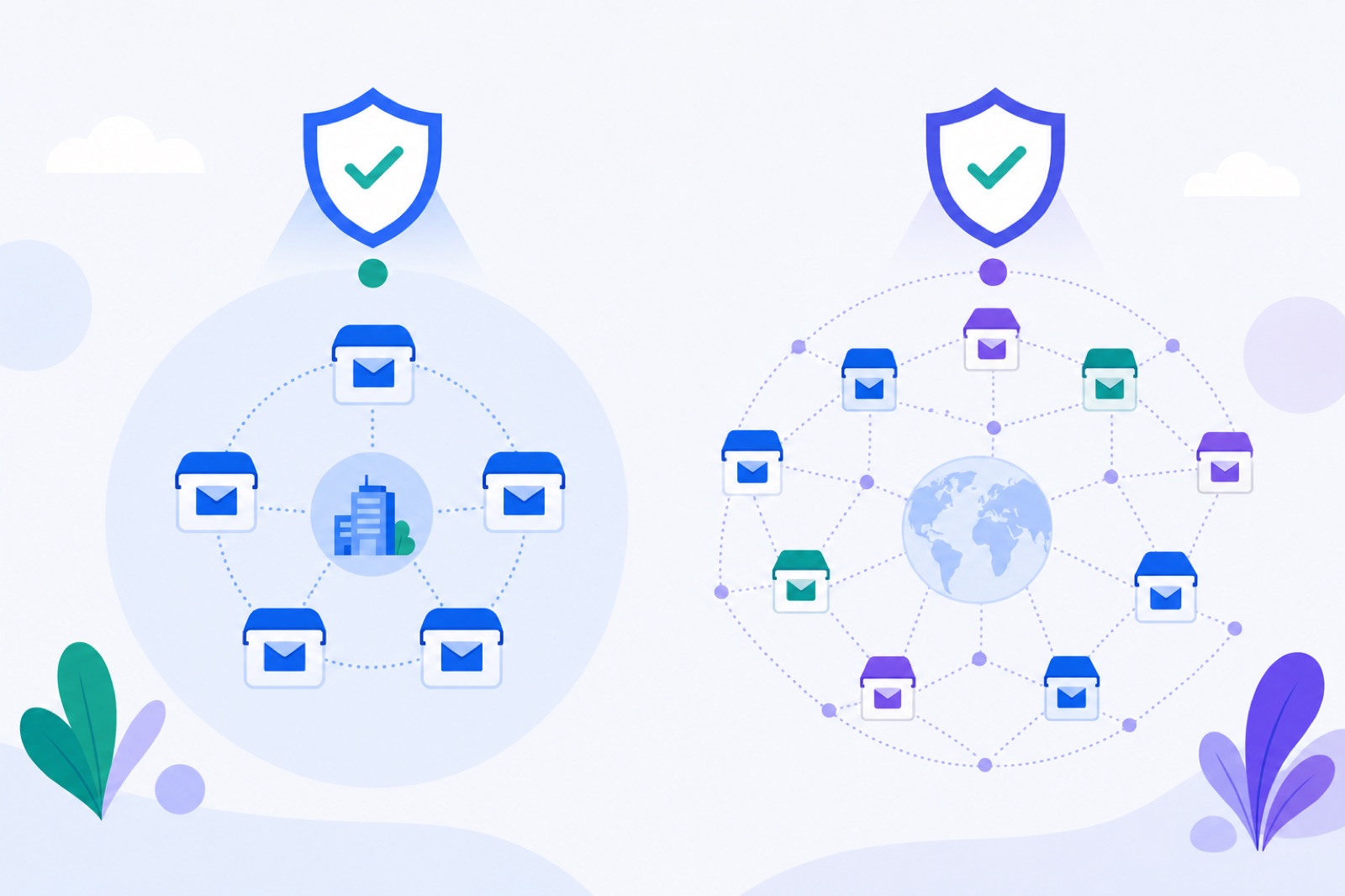
A private email warmup pool is usually safer when you can connect at least 2 controlled mailboxes. If you choose the wrong model, you may expose sending addresses, inherit weak neighbours, or trust engagement signals you cannot verify. This guide compares private and public pools, gives safe operating numbers, and shows the checks to run before you add volume.
Warm-up is controlled sending, receiving, replying, and spam-folder rescue for warm-up mail. It does not fix bad DNS, bad lists, or high complaint risk. If you want the mechanics first, read our guide to how an email warm-up network works, then use the warm-up strategy page to plan your ramp.
Your choice is not only private or public. You are deciding who receives your addresses, who controls mailbox quality, how spam placement is measured, and whether the pattern looks like normal human mail.
What is an email warmup pool?
A warm-up pool is the group of mailboxes that exchange warm-up emails with each other. Each mailbox sends small volumes, receives mail from peers, and creates a history of wanted interaction.
A private pool uses only mailboxes you control. If you connect five company mailboxes, those five mailboxes write to each other. Nobody else’s inbox receives your warm-up mail through the pool.
A public network uses mailboxes from many users. Your mailbox may send to, and receive from, strangers in the provider’s network. The pool can be larger, but the trust boundary is weaker.
A private pool is the safer choice for a team warming a new domain, client domain, founder alias, recruiting inbox, or agency mailbox. A public network can help when you have only one mailbox or need more recipient diversity, but only if the provider explains its controls.
Neither model replaces deliverability basics. Check SPF, DKIM, and DMARC before you warm. Google’s email sender guidelines are a useful baseline, including the advice to keep spam complaint rates under 0.1% and avoid 0.3% or higher.
How do private and public pools compare?
The main trade-off is control versus diversity. Public networks can add more recipient variety. Private pools make privacy, diagnosis, and mailbox quality easier to manage.
| Question | Private pool | Public network | What to check |
|---|---|---|---|
| Who receives your address? | Only your connected mailboxes | Other users’ mailboxes | Whether addresses leave your account |
| Who controls mailbox quality? | You do | The provider and its users | Screening, abuse removal, and login failure rules |
| How much diversity exists? | Limited by your domains and providers | Usually broader | Provider mix and repeated pairing controls |
| How is spam placement measured? | Your own inboxes can report it | Depends on the provider | Whether landings are checked in real inboxes |
| Can weak neighbours affect the pattern? | Only your mailboxes | Yes, if the network is poorly controlled | Network hygiene and sender vetting |
| Can you use one mailbox? | No | Often yes | Minimum mailbox requirement |
| Is privacy simple? | Yes | No | Recipient exposure and data handling |
A private pool is easier to audit. If a mailbox starts landing in Spam, you can pause it, fix DNS, reduce the ramp, or remove it.
A public network needs more proof. Ask how mailboxes are admitted, how often peers repeat, how spam placement is detected, and whether your mailbox sends to the same recipients too often.
Also ask what the tool sends. Warm-up content should look like plain office mail. Plain text is safer than image-heavy or link-heavy content. Tracking links and aggressive templates make warm-up look less natural.
When does public size help?
Public-network size helps when diversity solves a real limitation. A larger pool may include more recipient domains and mail hosts than you can create yourself.
Public size can help when:
- You have only one mailbox and cannot form a private pool.
- Your private pool would use one domain only.
- You need more provider variety.
- Your domain is already authenticated and stable.
- The provider screens and removes risky participants.
Size does not fix a noisy network. Ten healthy, authenticated mailboxes are better than a large pool of broken or overused accounts. A public provider should be able to explain admission rules, volume caps, and removal rules without vague reputation language.
Look for operational controls. The network should avoid repeated pairings, spread mail across the day, keep volumes low, and detect when mail lands in Spam. It should not rely only on separate seed-list reports if the warm-up activity itself happens elsewhere.
Yahoo’s sender best practices make the broader point: authenticate mail, send wanted messages, and keep complaint behaviour under control. Warm-up supports that work. It does not replace it.
Public networks also need content discipline. If many users share the same subjects, timing, and reply pattern, providers may learn the pattern. Good systems vary timing, pairings, and thread behaviour without pretending warm-up replies are real prospect interest.
Use a public network only when you need diversity and can inspect the provider. Avoid providers that hide the pool design behind claims they cannot verify.
Where do strangers add risk?
The biggest public-network risk is neighbour quality. Your mailbox interacts with accounts you do not control. Some may be healthy. Others may be new, misconfigured, abandoned, or tied to aggressive outreach.
Email providers evaluate reputation through several signals, including authentication, volume, content, engagement, and user feedback. You cannot transfer another sender’s exact reputation to yourself, but shared warm-up activity can still create risk if the pattern looks artificial.
Address exposure is the second risk. In a public network, strangers’ inboxes receive your sending address. That may be fine for some teams. It may be unacceptable for agencies, founders, recruiters, finance teams, or anyone using sensitive aliases.
Exposure creates practical questions. Can another participant export your address? Can they reply manually? Can they mark your mail as spam? Can their mailbox be compromised? A provider may have safeguards, but you should not assume them.
False confidence is the third risk. Public dashboards may show opens and replies, but that does not mean prospects want your real emails. Warm-up replies are controlled interactions. They help with ramping and placement checks, not message-market fit.
Bad patterning is the fourth risk. If warm-up mail always arrives at the same minute, uses the same subjects, or receives instant replies, it may look synthetic. A strong system adds randomness, caps repetition, and keeps threads modest.
Authentication mistakes are still yours to fix. Before you use any pool, check your records with the free SPF checker, DKIM checker, and DMARC checker.
Microsoft’s anti-spam and deliverability documentation follows the same general principle: authenticated, wanted, consistent mail is safer than sudden, sloppy volume.
How does a private pool work?
A private pool keeps the recipient set inside your account. Your connected mailboxes write to each other. Nobody else’s inbox receives your addresses through the pool.
That makes privacy simpler. It also makes diagnosis clearer. If a mailbox has bad DNS, loses login permission, or lands in Spam too often, you know where to look.
The trade-off is scale. A private pool with two mailboxes has one pair. Five mailboxes create more possible pairings. Ten creates more again. Diversity improves when mailboxes sit on different domains or providers, as long as those mailboxes are legitimate and maintained.
Private pools work best when you already have several real mailboxes. They work less well when every mailbox is brand new, on the same domain, and hosted by the same provider. You still get controlled sending, but less diversity.
BobWork Email Warm-up offers both models. The default is the shared network; switch an account to Private pool in the dashboard and only that account’s mailboxes write to each other. The free pool starts at 3 emails per day, adds 2 per day, and caps at 30 per day unless you edit the mailbox cap.
Sends run across 09:00–18:00 in the mailbox’s own time zone, with randomness checked every 15 minutes. Weekends run at 30%. A pair does not write to each other twice within 3 hours. Peers on a different domain or provider are picked twice as often.
About 40% of received warm-up mail gets a reply, and threads stop after 3 messages. Content is plain office talk: plain text, no links, no images, and first-name greetings.
Spam rescue is limited to warm-up mail. Mail found in Spam is moved to Inbox, marked read, labelled Warm-up, and archived after 24 hours. Only mail carrying the engine’s hidden header, or a known Zoho API subject, is touched. Real mail is never read, moved, or answered.
There are limits. BobWork is free, needs at least 2 mailboxes only in private-pool mode, and allows up to 20 mailboxes per account. Gmail and Google Workspace can connect with Google sign-in using the gmail.modify scope, but Google shows an unverified-app notice because the CASA audit has not been done. Outlook and Microsoft 365 are not supported yet because Microsoft requires OAuth.
For timing expectations, read how long email warm-up takes before you react to early spam landings.
What numbers should you use?
Use numbers, not feel. Warm-up should start low, rise slowly, and stay below your real outreach ceiling. If a provider publishes a hard limit, follow that. If it does not, use conservative ranges and watch placement.
| Setting or signal | Safer number | Applies to | Why it matters |
|---|---|---|---|
| Minimum private pool size | 2 mailboxes | Private pools | One mailbox cannot exchange warm-up mail |
| Starting warm-up volume | 3 emails/day | BobWork engine | Reduces sudden-volume signals |
| Ramp speed | +2 emails/day | BobWork engine | Builds consistency gradually |
| Default warm-up cap | 30 emails/day | BobWork engine | Enough for warming without heavy noise |
| Editable cap | Up to 100 emails/day | BobWork mailbox setting | Use only when your plan justifies it |
| Weekend volume | 30% of weekday level | BobWork engine | Avoids a machine-like seven-day pattern |
| Maintenance warm-up | 10–15/day | During campaigns | Keeps activity alive without crowding outreach |
| Real outreach ceiling | 30–50/day/mailbox | Recommended practice | Add mailboxes instead of forcing one inbox |
| Existing domain warm-up | 14+ days | Recommended practice | Gives time to observe placement |
| New domain warm-up | 3–4 weeks | Recommended practice | New domains need more history |
| Pause threshold | Above 5% spam rate | Recommended practice | Stop sending while you fix causes |
| Google complaint target | Under 0.1%, never 0.3%+ | Real complaints | Complaints damage reputation |
Do not confuse warm-up spam rate with complaint rate. Warm-up spam rate measures where test warm-up mail landed. Complaint rate measures real users reporting your mail as spam.
BobWork’s spam rate is the share of a sender’s warm-up mail that receiving mailboxes found in Spam over 7 days. A mailbox is ready for outbound when it has warmed for 14 or more days, has a 7-day spam rate of 3% or lower, and has received at least 30 warm-up emails.
These numbers slow you down on purpose. Many deliverability problems start with the same pattern: a new domain, a new mailbox, a fresh list, and 100 cold emails on day one. Warm-up cannot protect that.
If authenticated mail still lands in Spam, troubleshoot the cause. Start with why emails go to spam, then check DNS, domain age, content, links, volume, lists, and reputation.
Do this now
Use this checklist before you trust any pool, private or public.
| Step | Action | How to verify |
|---|---|---|
| 1 | List every mailbox you plan to warm | You have at least 2 for a private pool |
| 2 | Check SPF, DKIM, and DMARC | DNS tools show valid records for the sending domain |
| 3 | Set your privacy boundary | You know whether strangers will receive your address |
| 4 | Inspect pairing rules | The provider explains repetition limits and timing randomness |
| 5 | Confirm spam detection | Spam placement is measured in receiving inboxes |
| 6 | Start with a low ramp | Day one starts around 3 emails, then rises gradually |
| 7 | Cap real outreach | Campaign sending stays around 30–50/day/mailbox |
| 8 | Watch 7-day spam rate | Pause or reduce if it rises above 5% |
| 9 | Keep maintenance warm-up | Warm-up stays around 10–15/day during campaigns |
| 10 | Review weekly | DNS, spam placement, replies, and blocks are checked together |
Choose a private pool when privacy matters, when you have at least two mailboxes, or when you do not want strangers receiving your addresses. That is the safer default for founders, agencies, consultants, recruiters, and teams handling client domains.
Choose a public network only when its diversity solves a real limitation. The provider should explain peer selection, authentication checks, broken-mailbox removal, real-inbox spam detection, address protection, and repetition controls.
Avoid any provider that promises guaranteed inbox placement. No warm-up system can guarantee that. Inbox placement depends on recipient behaviour, provider filters, domain history, content, authentication, list quality, and complaint rates.
Also avoid using warm-up to mask bad outreach. If your real campaign uses scraped lists, misleading subjects, link-heavy copy, or high daily volume, warm-up may delay problems but will not remove them.
Whichever model you choose, you can start with BobWork Email Warm-up. It is free, has no credit card and no time limit, supports up to 20 mailboxes per account, and runs the shared network by default with a Private pool switch per account. Use it unless you need Outlook or Microsoft 365 support today.
Frequently asked questions
Is a private warm-up pool always safer?
It is safer for address exposure and neighbour control because only your own mailboxes participate. It is not always stronger for diversity. If all mailboxes are on one new domain, you may get fewer provider and domain signals than a well-run public network.
Can a public warm-up network hurt my domain?
It can if the network includes low-quality, abused, or poorly authenticated mailboxes. You are also sending to strangers’ inboxes. Check how the provider screens accounts, handles spam rescue, protects your addresses, and prevents repeated patterns.
How many mailboxes do I need for a private pool?
You need at least two mailboxes. More is better because it creates more sending pairs. If possible, use different domains or providers, but keep volumes low and authentic. Do not add weak mailboxes just to increase the count.
Does warm-up guarantee inbox placement?
No. Warm-up can build positive engagement patterns and reveal spam placement, but it cannot override poor authentication, bad lists, misleading content, blocklists, or high complaint rates. Treat it as one part of deliverability hygiene.
Should I stop warm-up during campaigns?
Usually no. Keep warm-up running at a lower maintenance level, typically 10–15 emails per day per mailbox. Avoid aggressive warm-up and outreach at the same time. If spam placement rises, pause or reduce sending.
What spam rate is too high?
For warm-up monitoring, pause or reduce a mailbox if spam placement goes above 5% for a few days. For real recipient complaints, Google advises keeping spam complaint rates under 0.1% and avoiding 0.3% or higher.
Can I use one mailbox for private warm-up?
No. One mailbox cannot create a private pool because it has nobody to exchange mail with. You need at least two inboxes, and the value improves when those mailboxes are healthy, authenticated, and not all identical.
Warm up your mailboxes free
Connect Gmail, Google Workspace, Zoho or Lark. Your mailboxes warm on a shared network, or in a private pool of your own, starting today.